
Getting in, WinShark Canada
WinShark Casino Login and Account Access
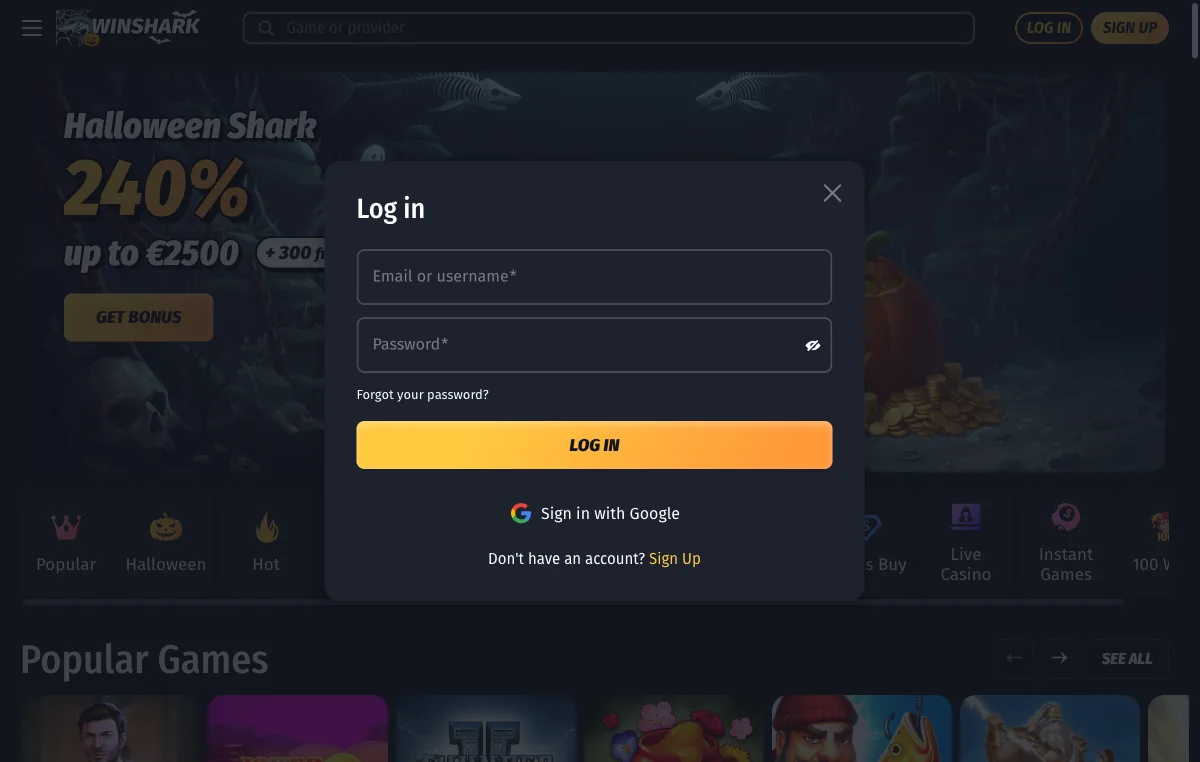
Two boxes, one button, and a Google shortcut beside them. That is the entire WinShark login.
So this page is deliberately short. The screen really is small, and padding it out would waste your afternoon. What you get instead: the exact field labels, the sign-up step half the searchers actually need, and a table covering nine ways access goes wrong.
Everything below was read off WinShark’s own public pages on 26 October 2026. We never funded an account, so nothing here describes what sits behind the log-in. Where that matters, I say so.
Signing In to WinShark Casino from Canada
Four moves, and you are through.
- Load the operator’s site and glance at the address bar first. The access controls sit in the top strip.
- Choose Log in. Landed on the registration panel instead? The “Don’t have an account? Sign Up” line runs both ways.
- Fill the box labelled “Email or username”. Both work — your email is not your only handle here.
- Add your Password and press Log in. Or skip both fields and use “Sign in with Google”, if that opened the account.
The same modal serves a phone browser; our WinShark mobile page covers the home-screen side.
The WinShark Sign-Up That Comes Before the Login
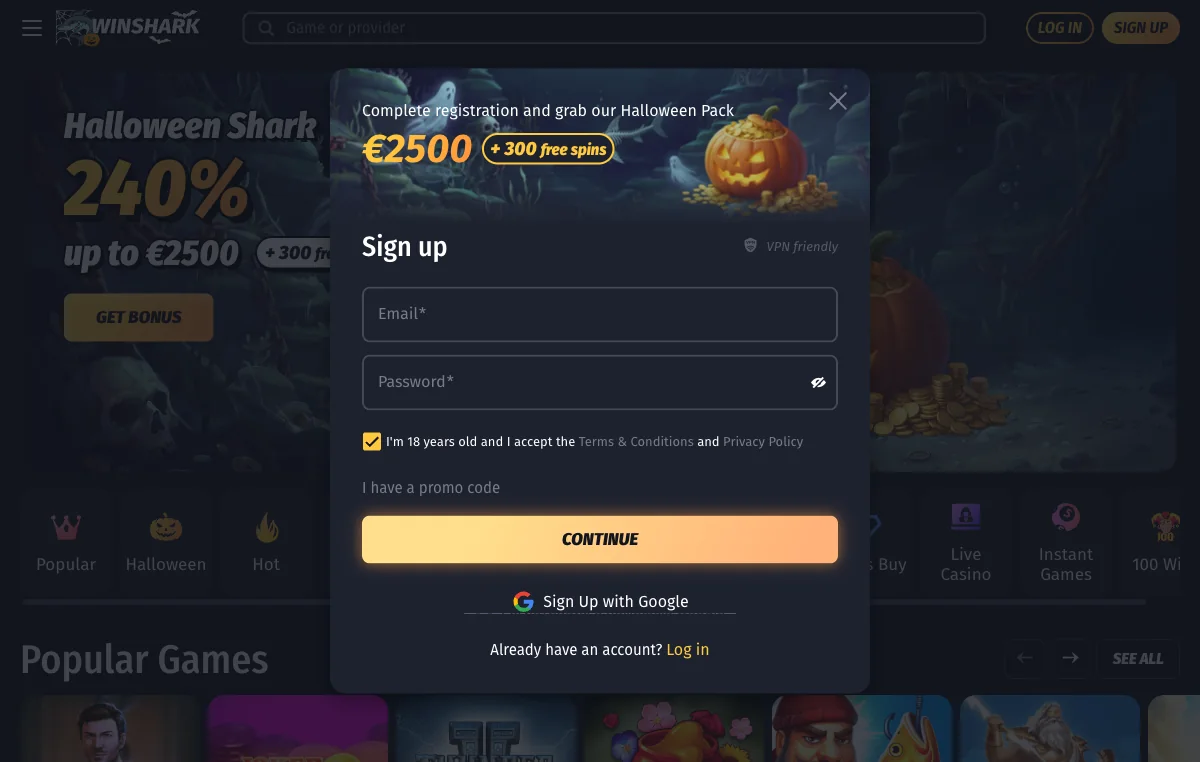
Plenty of people searching for a log-in screen have no account yet. If that is you, the first step is smaller than you expect: an email, a password, nothing else mandatory.
The registration panel is step one of two. Alongside those fields sit an age tick-box and an optional “I have a promo code” box. Leave it empty and you lose nothing — WinShark’s Welcome Pack credits without a code, which is the thing most people want to know when they sign up, and the answer is dull. The tier breakdown sits on our WinShark bonus page. There is a Google route here too, and a “VPN friendly” label on the panel, which we report because it is there, not as advice.
Now the bit that deserves a flag.
The tick-box reads “I’m 18 years old and I accept the Terms & Conditions and Privacy Policy”. That wording was written for a Curaçao licence, not for Canadian law. The minimum here is 19 in British Columbia, Saskatchewan, Nova Scotia, New Brunswick, Prince Edward Island, and Newfoundland and Labrador, and 18 in Alberta, Manitoba and Quebec. Ontario sets 19 for online casino play. Go by your province, not by the box.
When the WinShark Login Will Not Work
Most advice for this stops at “clear your cache”, which fixes exactly one of the nine things that actually go wrong. Below, each failure and the move that clears each fastest.
| What you are seeing | Likely cause | What to do about it |
|---|---|---|
| Email or username refused | Not the handle on the account, or autofill added a trailing space | Type it by hand, both ways round |
| Password rejected, though you know it | Caps lock, a second keyboard layout, or a manager holding an older entry | Retype it somewhere visible and safe, then use “Forgot your password?” |
| No account found | It was opened by Google, or under a different address entirely | Try the Google button, then ask live chat which address is on file |
| Page blank or only partly drawn | Heavy single-page application — a slow connection or aggressive content blocker leaves the shell with no modal in it | Reload, allow scripts for the domain, or try another browser |
| Bot check loops and never clears | A privacy extension blocking the challenge, or stale cookies | Switch the extension off here, clear the domain’s cookies, retry |
| Session drops mid-play | Mobile handoff between data and Wi-Fi, or cookies cleared on close | Avoid private windows for play; sign in again instead of refreshing |
| “Sign in with Google” bounces you back | The account carries an email and password, no linked Google identity | Use the email route; Google cannot adopt an existing password account |
| Account appears locked | A security or verification hold the modal will not explain | Write to [email protected] with timestamps. Do not open a second account. |
| You forget which email you used | Several addresses, one registration, a year ago | Search each inbox for the welcome message rather than guessing |
One warning: a second account is the quickest route to a voided bonus at almost any offshore operator.
Resetting a Forgotten WinShark Password
The link sits directly under the password field: “Forgot your password?”. Click it and the reset runs on the email address attached to the account.
One limit, stated plainly: we did not open an account, so we cannot show you the reset screens. What we can say is what to do when the email never lands: wait ten minutes, check junk and any promotions tab, then search your mail for the brand name instead of scrolling by date. An old address on file is the usual culprit.
If the mailbox stays empty, two human routes remain. Live chat runs 24/7 and is faster; [email protected] gives you a written thread with timestamps, the version you want if this becomes a dispute. Chat leaves no record unless you save the transcript.
Keeping a WinShark Account Secure
A gambling account holds money and identity documents. Treat it like a bank login.
- Use a password that exists nowhere else. Reuse is how casino accounts are actually lost — through a leak somewhere unrelated.
- Let a password manager generate and hold it; you then never type it again.
- Know what the Google route changes. It moves the lock onto your Google account, whose own protection then stands between a stranger and your balance.
- On a shared computer, never let the browser remember the password, and close the session instead of walking away.
- If you suspect someone else has been in there, change the password, then ask [email protected] to hold the account.
On two-factor authentication: we found no published description of it on WinShark’s public pages, and I will not invent a feature. Ask live chat whether a second step exists rather than assume one protects you.
Sign in, and the Welcome Pack is waiting if you have not used it. WinShark runs 240% across your first three deposits, published in euros, 45× wagering, C$7 maximum bet while a bonus is live.
Why a WinShark Login Is Not the Same as Being Verified
Signing in and being verified are two different states, and mixing them up is how people get surprised at the cashier. A password gets you into the account. Verification releases money out of it, and WinShark runs that through [email protected].
It happens before a withdrawal, not before a deposit, which is why so many players meet it at the worst moment. Do it early. The document checklist and the formats that get rejected sit on our WinShark payouts page.
Look-Alike WinShark Login Pages
Search this term and the results fill with near-miss domains: hyphenated variants, extra words bolted on, pages built to look exactly like a sign-in screen. The pattern matters, not any one address, and a logo tells you nothing — logos are a right-click away.
So check where you are before typing a password. Read the domain character by character, and be suspicious of a hyphen or a stray word. A genuine log-in control opens as a modal over the lobby, not as a bare page. Then bookmark it and use the bookmark.
Plenty of people type the words the other way round, as casino WinShark, and land on the same mixed results. The same address-bar check settles it either way.
Closing or Pausing a WinShark Account
You do not need a reason, and nobody should ask for one. Write to [email protected], say whether you want a temporary break or the account closed for good, and keep the reply.
Ask in writing even if live chat offers to handle it, because a transcript you did not save is not a record. Wanting a break? Say how long. Our responsible gambling page carries the Canadian help lines and provincial tools, which work on their own terms — an offshore operator is not a way round a self-exclusion you already set.
WinShark Login Questions
Two things. The first box reads “Email or username”, the second reads “Password”, with “Forgot your password?” underneath and a Sign in with Google button beside them. No account number, no province, no security question. Anything more than that is not the operator’s modal.
No, but you may have both. Registration takes an email, while the log-in field accepts a username too, which means a handle can exist on the account alongside the address. Either one opens the door. Pick whichever you can recall exactly and keep using that one.
Give it ten minutes, check junk and promotions folders, then search your mail for winshark rather than scrolling. Still nothing suggests the address on file is not the one you typed. Open the 24/7 live chat, or write to [email protected] from the address you think is on it.
Treat it that way. Sign in with Google and an email-and-password registration are two separate routes, and using the wrong one later tends to produce a no-account-found message instead of a helpful hint. Whichever button opened the account is the button that reopens it.
We found no published description of two-factor authentication on the operator’s own pages, so we will not tell you it exists. Ask live chat whether a second step can be switched on. Until someone says yes in writing, treat your password as the only lock on that door.
Almost certainly not. The site is a heavy single-page application that pulls its lobby in after the shell, so a slow connection or an aggressive content blocker can leave you with a frame and no log-in control in it. Reload, allow scripts for the domain, or switch browsers.
Because the box was written for an operator licensed in Curaçao, not for Canadian provincial law. Nineteen is the minimum in British Columbia, Saskatchewan, Nova Scotia, New Brunswick, Prince Edward Island, Newfoundland and Labrador, and for online casino play in Ontario. Eighteen covers Alberta, Manitoba and Quebec. Your province decides.
Ask in one sentence, in writing, to [email protected], and say whether you want a break or a permanent closure. Keep the reply. A cooling-off request should not need a reason and you are not obliged to supply one. Canadian help lines are listed on our responsible gambling page.